Last updated on August 1st, 2018 at 06:19 pm
Starting a new blog can be confusing. How do I know if I installed WordPress.org or WordPress.com blog? I’ve seen this question asked several times in Facebook groups, so I thought that it was time to answer it to help you out.

Have you purchased a domain name and set up WordPress?
[clickToTweet tweet=”Pick My Virtual Brain With Your Basic Blogging Questions #askSusan @susanvelez.com” quote=”Pick My Virtual Brain With Your Basic Blogging Questions #askSusan @susanvelez.com” theme=”style4″]
Are you confused about whether you set up a self-hosted blog or a free WordPress.com blog?
Related: 7 of My Favorite WordPress Plugins I’m Using On This Blog
What You’re Going to Learn
In this tutorial, you’re going to learn how to buy a domain name.
Then we’re going to learn the difference of installing a self-hosted WordPress blog or signing up for a free WordPress.com account.
Yes, there’s a difference. I see it all the time in Facebook Groups. How do I know if I have a self-hosted blog or a free WordPress blog?
How Do I Know If I Installed WordPress.org or WordPress.com
Personally, when it comes to a free WordPress.com blog, I know nothing! So this post is a learning curve for me.
I’ve always used a self-hosted blog from the very beginning.
The easiest way I thought I would explain the answer of “how do I know if I installed WordPress.org or WordPress.com is to walk you through the process of setting each one up.
This way, you’ll be able to see the difference in the process. You’ll also notice the difference in what it costs to start a self-hosted blog.
We’ll also take a look at the difference of paying for WordPress.com (this isn’t the platform that I use) to host your domain for you.
It’s a lot more than you think and personally a waste of money. (of course, your opinion may vary from mine)
I’m going to start with my favorite platform which is a self-hosted WordPress.org blog.
Let’s get started…
How To Buy A Domain Name
If you look at my blog, my domain is susanvelez.com. I registered my domain for 7 years so I could get a big discount on it 🙂
As you can see, I am just using my name. If you’re having trouble choosing a domain name, here’s a great tutorial that can help you.
This tutorial isn’t meant to help you choose the right domain. I’m assuming that you already have a domain name in mind.
Once you’ve brainstormed and come up with a domain name, then it’s time to head on over to your favorite Domain Registrar.
Personally, I use Namecheap for all my domains. Feel free to register your domain anywhere.
However, since I only have access to Namecheap, I’ll be taking you inside the Namecheap Dashboard.
Sign up with Namecheap
You’ll first need to create an account with Namecheap and you can sign up here.
Once you’ve created your account, it’s time to pay for our domain name that you’ve chosen.
If you’re setting up a self-hosted blog, you’ll need to point your Domain Servers to your hosting account before your blog can go live. Here’s a great tutorial on how to do this if you’ve never done this before.
You’ll need to sign up with a reliable hosting account in order to set up a self-hosted blog. I personally use SiteGround for my blog.
Related: SiteGround Review My Opinion From A Happy Customer
Getting Hosting
When you decide to start a self-hosted blog, you’re going to have to pay for your own hosting.
There are literally tons of different hosting accounts that you can sign up with. You can find some of them below:
- SiteGround (this is who I use)
- BlueHost
- WP Engine
- etc…
Choose one of these or any other reliable hosting account you want to use.
Once you’ve paid for your hosting service, it’s time to start setting up a self-hosted blog.
Setting Up Your Blog
For this tutorial, I’ll be using SiteGround as this is the cPanel that I have access to. By the end of this tutorial, you’ll have your own self-hosted blog.
Connecting Your Domain to Your cPanel
Log into your cPanel and go to Addon Domains.
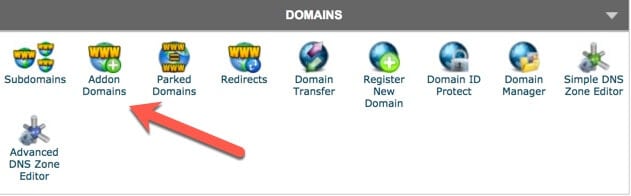
Click on it and you’ll be able to add your new domain to your hosting account.

Click on Add Domain.
There you go, your domain has now been added to your SiteGround cPanel.
Now it’s time to install a self-hosted WordPress blog. Also known as the WordPress.org version.
Installing WordPress.org
Most hosting accounts have a one-click installer. This means you don’t even need an FTP client to get WordPress installed.
All you need to do is fill out a few lines and then your blog will be set up and ready for you to start blogging.
For this purpose, I’m going to walk you through the one-click installer. I’ve written a tutorial on different ways to install WordPress, you can read it here.

Click on the WordPress Auto Installer.
You’ll have several different options. We want to install a new fresh WordPress blog.
Click on install. Now we want to fill out all the information you see on this page.
It’s pretty self-explanatory, so I won’t go through everything. If you need a complete step-by-step tutorial, you can read my tutorial on how to start a blog.
Click Install
Once you fill out all the information on the page, click on install.
You’ve done everything you need to do. You’ll get your password and login information sent to the email you used for the installation.
You’ll notice that your login URL is something like this.
Congratulations your self-hosted blog is setup. Now you can log in and start writing your first blog post.
Related posts on starting a self-hosted blog:
- 6 Crucial Blog Configurations
- How to Start A Blog On SiteGround
- Getting Started With WordPress What You Need to Know
Now that you know how to setup a self-hosted blog. It’s time to take a look at setting up a free WordPress.com blog.
Setting Up A WordPress.com Blog
As I mentioned above, I’ve never used WordPress.com for my blogging platform.
I’ll do the best to explain the process from start to finish. I won’t be paying to upgrade my account.
For this tutorial, I went ahead and created a free WordPress account so I could walk you through what you’ll see if you want to use a free blog.
Log into your WordPress account
If you haven’t signed up for one, head here to create your account.
Go to my sites >> Domains >> Add
Next, you’ll type in the domain you want to use for your blog.

You’ll notice that you’re going to get charged $13.00 per year.
This fee is for them allowing you to use your domain instead of the typical WordPress.com extension.
You don’t have to buy a domain and you can start using a free blog right out the gate. However, your domain name will have a WordPress.com extension.
For Example
If this blog was hosted on a free WordPress.com blog, my domain would look like this.
If you’ve never purchased a domain name, you might think that $13.00 per year is a reasonable cost.
However, you can get a domain name a lot cheaper at most other reliable Domain Registrar Servers.
If you’re happy with that price and want to continue, then you’ll enter your domain name.
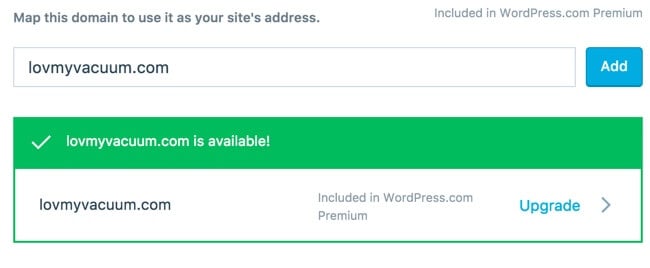
You’ll get a notification to let you know that your domain name is available.
Next
You’re going to be asked to enter your payment details for a ridiculous amount of money.

For just $89.00, you’ll get a WordPress.com premium account.
That may not sound like a lot of money, however, in my opinion, it is. Especially, when you can get started on SiteGround for a lot less, click here to see the price.
Like I said, I don’t know anything about using a free WordPress.com platform. You can read about the WordPress.com terms of service.
Now That You Know The Difference
I’ve walked you through the process of installing a domain and setting up both a WordPress.org blog and a WordPress.com blog.
So now you should be able to answer the question “how do I know if I installed a WordPress.org or WordPress.com blog?”
Which One Is Better?
Opinions will vary on this. You’ll hear people say that you should start on a free platform because it doesn’t cost you anything.
You can test the waters and see if you really have what it takes to become a blogger?
In my opinion, using a self-hosted blog is the best. You can add themes, plugins and do pretty much anything you want with your blog.
You’ll notice that I linked to the Terms and Service page of the free WordPress.com platform. Unfortunately, you’ll have to follow their rules if you use their platform.
If you decide to use a self-hosted blog, you don’t have any rules to follow. You can post anything that you want.
The only restrictions are the ones that you impose on yourself. You won’t have to worry about monetizing your blog too early. In fact, you can start monetizing your blog from day one.
So would you rather have restrictions on your blog? Or would you rather be the sole creator of your blog and do what you damn well, please?
Only you can answer that question. The most important thing to do is to start your blog, it doesn’t matter which platform you use. If you decide to use the free platform, you can always migrate to a self-hosted blog later.
Final Take Away
Hopefully, this post helped you see the difference between starting on a free platform or setting up your own self-hosted blog.
I know that a lot of people choose to go the free route because of the huge learning curve that comes with a self-hosted blog. Sign up for my FREE 7 day WordPress course to help you overcome the techie part.
I’m hoping that you choose to go with a self-hosted blog. If you’re blogging to build a business, a self-hosted blog is the best way to go.
Hand Picked Articles for You
- How to Start A Blog On SiteGround
- 6 Crucial Blog Configurations
- 5 Things to Do After Installing A Self-Hosted Blog
How long have you been blogging? Did you start your blog on a free platform or not? Let me know, I’d love to hear how you got started.


Hello Susan,
Great tips over here 🙂
I too have seen many people getting hyper over, have the access to WordPress.org or WordPress.com.
Its like newbies get confuse as, what they have in their computer and what they were excepting for real. The screen shot you
uploaded up here are of great help. They always help to get thing easier.
Indeed self hosted blog are best thing to go for, there is no restriction and we can customize them buy the way we want
Thanks for the share.
Have a great week ahead.
Shantanu.
Hi Shantanu,
Glad you found the post helpful. Hopefully, I’ll be able to help at least one person understand the differences between the 2 WordPress platforms.
Like you, I prefer the self-hosted WordPress platform better. I like the freedom of being able to do whatever I want.
Thanks for taking the time to stop by and have a great day 🙂
Susan
hi Susan Velez
hope you are fine… im new here …so i was bit confuse about wordpress.org and wordpress.com…i read your article which was very impressive thank for your afford which help me alot…keep it up and best of luck
Hi Rubab,
Glad to hear that my article helped you get a better understanding of the difference between the 2 different WordPress versions.
Thanks for taking the time to stop by and comment, have a great day 🙂
Susan
Okay… so the difference is that WordPress.com is Fully hosted paid service and WordPress.org is Opensource Free service. Got It! Thanks
Hi Waqas,
That’s an easy way to explain it, thanks for taking the time to stop by and comment.
Have a great day 🙂
Susan
Hi Susan,
I’m so glad you wrote this! I accidentally started with wp.com when I meant to sign up with wp.org. I didn’t know the difference back then and it wasn’t until Bren and Lisa mentioned it on Twitter – that was my aha moment. 🙂
It took a lot of work to migrate from one site to another and then to wp.org…it was a nightmare but I figured it out. 🙂
This is a great walk through you shared too, this will definitely help new bloggers with their wp set up.
Great post Susan! Hope you’re having a great week so far!
Cori
Hi Cori,
I’ve personally never had to migrate from WordPress.com to WordPress.org. I started with WordPress.org. Not sure how I figured it out because I had no clue what I was doing when I got started either.
Hopefully, this will help someone out who may be confused about which version is which.
I am having a great week, thanks for asking.
Thanks for taking the time to stop by and comment, have a great day 🙂
Susan
Hi Susan,
Great insights shared over here. You’ve cleared the confusion of beginner bloggers who might still have questions about whether to go for WordPress.com or WordPress.org
Clearly, for everyone who need to grow faster and looking for long-term success, self-hosted WordPress is the ideal choice.
Thanks for sharing.
– Shafi
Hi Shafi,
You’re right, starting on a self-hosted WordPress blog is definitely the way to go if you’re trying to do this long-term.
Thanks for taking the time to stop by and comment.
Have a great day 🙂
Susan